
Frequently asked questions
What is polyurethane foam?
Polyurethane foam, or PUR, is a lightweight and strong material invented in Germany in 1937. It consists of tiny closed cells: solid material makes up 3% of its volume, while 97% is pores filled with gas.
As a result, polyurethane foam retains temperature perfectly, since the thermal conductivity of gases is tens and hundreds of times lower than that of solid materials.
What is PIR insulation?
PIR stands for polyisocyanurate. PIR differs from ordinary polyurethane foam in the ratio of the main components of the mixture: polyol and isocyanate. For PIR the ratio is approximately 1:1.5, while for ordinary polyurethane it is 1:1.1.
PIR insulation contains more isocyanate than PUR, which provides increased fire resistance.
What is PIR Plita?
PIR Plita® is a universal insulation made of PIR polyisocyanurate with facings of paper, foil, film, fiberglass and other materials.
It is used to insulate any facilities: balconies, cottages, saunas, industrial buildings, flat roof construction.
What is PIR Premier?
PIR Premier is a polyisocyanurate insulation developed by ProfHolod in-house. ProfHolod developed PIR Premier in 2016. ProfHolod sandwich panels with PIR Premier insulation demonstrate resistance of over 170 kPa in compression strength tests at 10% deformation and over 150 kPa in tensile strength tests at a density of 40 kg/m3.
The thermal conductivity of sandwich panels with PIR Premier reaches 0.0194 W/m·K.
How does the R&D Center help produce sandwich panels with PIR insulation?
The quality of sandwich panels with PIR insulation consists of three main components:
- The system, which includes the polyol blend, catalysts and additives — 40%
- The production line — 40%
- The people: professionals armed with the necessary knowledge — 20%
PIR systems require professional expertise. For this purpose ProfHolod has created the ProfHolod R&D Center, located on the production site, which ensures continuous product quality control. By controlling PIR at the molecular level using a polyester production unit, ProfHolod guarantees the physical and mechanical properties of sandwich panels with PIR Premier, because polyester is the main component of the PIR system.
The ProfHolod testing laboratory has confirmed its competence in accordance with GOST ISO/IEC 17025-2019 “General requirements for the competence of testing and calibration laboratories” in the Moscow voluntary certification system in construction “Mosstroysertifikatsiya”. ProfHolod accreditation certificate registration number: RU.MCC.АЛ.1231.
How to register in the ProfHolod Personal Account on your own
Video guide: how to register a company in the ProfHolod Personal Account
Watch the video in which we go through the registration of a new company step by step.
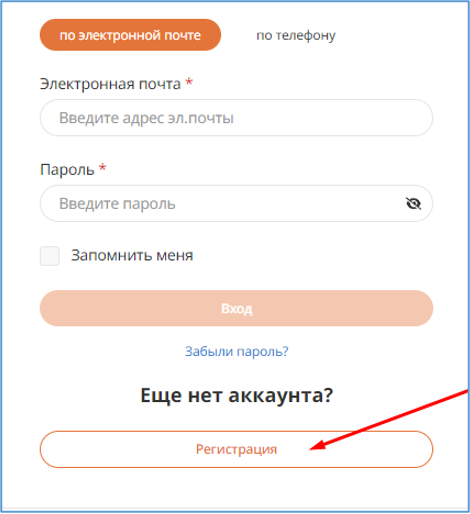
1. Logging in to the ProfHolod Personal Account
Go to the website https://lkk.profholod.ru/ on a computer or mobile device and click the “Register” button
2. Choosing a registration status
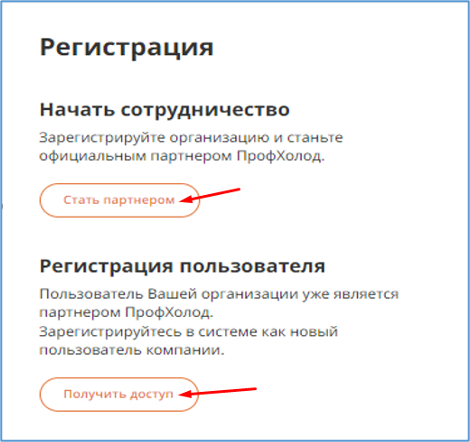
If your company has not yet been registered in the ProfHolod Personal Account, or you do not know whether it has been registered, select “Become a partner” and see step 3 of this guide.
If you know that your company already works in the ProfHolod Personal Account, select “Get access” and see step 4 of this guide.
3. Registering a new company
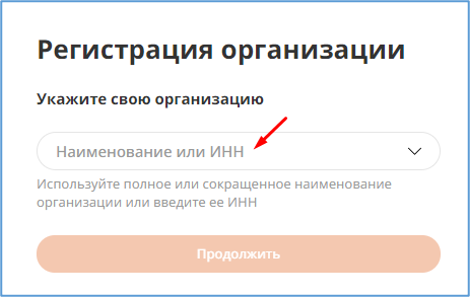
After you click the “Become a partner” button, enter the name or tax ID (INN) of your organization in the window that opens and click “Continue”
3.1 Checking the company details
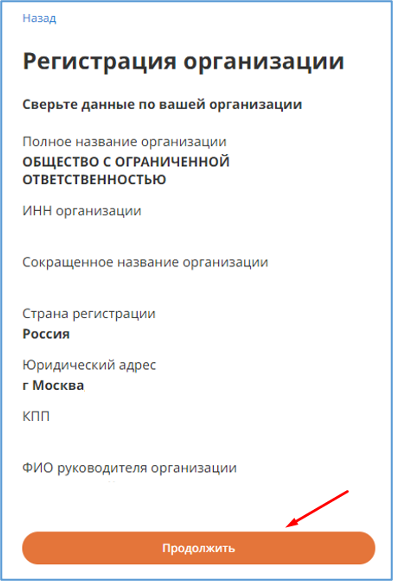
Check that the information about your company is correct. If everything is fine, click “Continue”. If the information is wrong, click “Back” in the upper left corner of the screen and enter the name or tax ID again
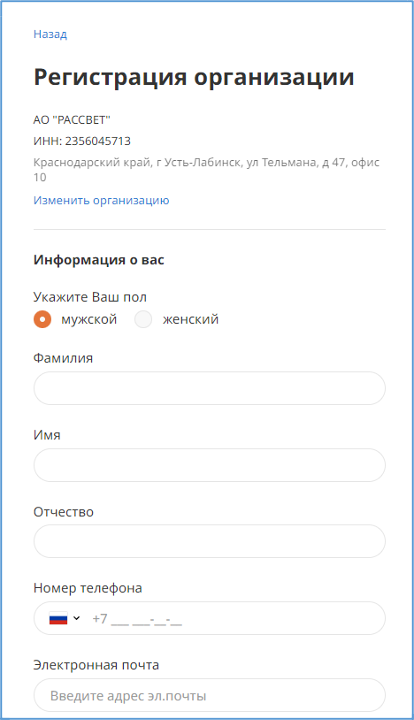
3.2 Registration details
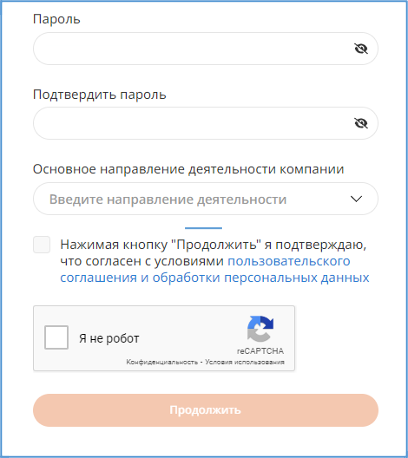
Fill in all the empty fields in the form that appears, read the terms of the user agreement, confirm your consent, check that you are not a robot, and click “Continue”.
Please note that the password must contain 8 characters, include digits, lowercase and uppercase letters, and must not match your name or email.
3.3 Completing the registration
A confirmation email will be sent to the email address you provided. Within one business day we will check the information, you will receive a notification by email and will be able to use the ProfHolod Personal Account.
4. Registering a new user from a company that already works in the ProfHolod Personal Account
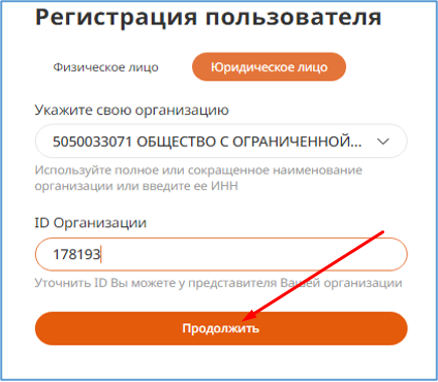
After you click “Get access”, select the status “Legal entity”
In the “Specify your organization” field, enter the name or tax ID of your company.
Check the details shown and enter in the organization ID field the number you can get from a colleague in your company who registered it in the ProfHolod Personal Account. If you do not know who registered the company, contact your personal manager at ProfHolod.
Click “Continue”
4.1 Confirmation code
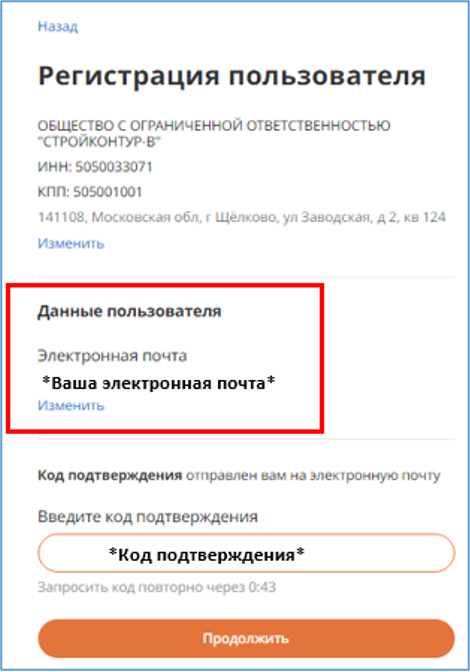
Enter your email address and phone number. Confirmation codes will be sent to your email and phone.
Enter the codes in the corresponding fields, read the terms of the user agreement, confirm your consent, check that you are not a robot, and click “Continue”
4.2 Completing the registration
A confirmation email will be sent to the email address you provided. Within one business day we will check the information, you will receive a notification by email and will be able to use the ProfHolod Personal Account.
Video guide: How to register a company in the ProfHolod Personal Account
Watch the video with step-by-step filling in of the required fields for registration in the personal account.